

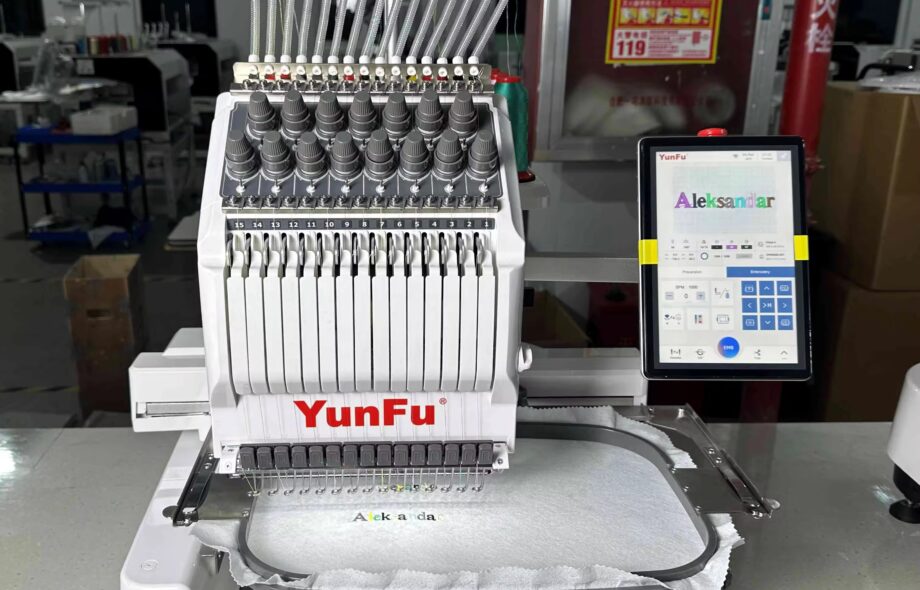
You have a beautiful vector file. Crisp lines, perfect curves, spot-on colors. You designed it in Illustrator, and it looks amazing on screen. But that vector file will never touch fabric. It cannot tell a needle where to go. It cannot account for thread tension or fabric stretch. To get that design from your computer onto a garment, you need someone who understands the bridge between digital art and physical thread. That bridge is professional Embroidery Digitizing Services.
The journey from vector to stitch is fascinating. It involves translation, interpretation, and technical skill. A vector file sees the world in shapes and paths. An embroidery machine sees the world in needle penetrations per inch and color change commands. Getting from one to the other requires a specialized craft.
Let me walk you through exactly what happens when you send a vector file to a professional digitizer. You will understand the process, the decisions involved, and why this step matters for your final product.
Why Vector Files Are the Ideal Starting Point
Before we dive into digitizing, let’s talk about why vectors beat everything else as source material. Vector files use mathematical paths instead of pixels. They define shapes with points, lines, and curves. This means they scale infinitely without losing quality.
When you send a vector file to a digitizer, they see clean edges and precise shapes. They do not have to guess where one color ends and another begins. They do not have to interpret blurry boundaries. The artwork is already perfectly defined.
Common vector formats include AI, EPS, PDF, and SVG. These files come from programs like Adobe Illustrator, CorelDRAW, or Inkscape. If you have the original artwork from a graphic designer, that is pure gold for digitizing.
Vector files also separate elements into layers or objects. The digitizer can see each part of the design independently. They know that the red circle is separate from the blue text. This makes their job faster and more accurate.
If you only have raster images like JPEGs or PNGs, do not despair. Good digitizers can work from those too. But vectors give you the best possible starting point and often cost less to digitize because they require less cleanup work.
The Digitizer’s First Look
When a professional digitizer receives your vector file, they do not immediately start clicking buttons. They study the design first.
They look at the overall complexity. How many colors? How much small detail? What is the smallest text size? These factors influence every decision that follows.
They consider the intended use. Is this for left chest polos, hat fronts, or jacket backs? Each application has size constraints and fabric considerations. A design destined for a cap needs different treatment than the same design for a tote bag.
They think about the fabric types you typically use. Heavy denim behaves differently than lightweight performance knit. Terry cloth swallows stitches if not digitized properly. Your digitizer wants to know what materials you stitch most often.
They identify potential trouble spots. Tiny serif text that will fill in. Narrow columns that might not register. Sharp corners where thread might build up. They note these areas for special attention during digitizing.
This planning phase happens before any actual stitch creation. It sets the direction for everything that follows.
Breaking Down the Design
With a plan in mind, the digitizer starts breaking your vector file into stitchable elements. In vector form, everything is shapes. In embroidery, everything becomes stitch types.
Satin stitches work for borders, text, and narrow columns. These create smooth, shiny edges and work well for elements up to about 12 millimeters wide. The digitizer identifies which parts of your design need that polished satin look.
Tatami stitches, also called fill stitches, cover large solid areas. They create a textured surface that looks consistent from a distance. The digitizer assigns tatami fills to backgrounds, large letters, and any area too wide for satin.
Running stitches handle fine lines, outlines, and underlay. These simple stitches move quickly and provide structure without adding bulk. The digitizer uses them for details that need definition but not heavy coverage.
Each element gets assigned a stitch type based on its shape, size, and role in the overall design. This is not automatic. It requires judgment and experience.
Setting Stitch Angles
Stitch angle might sound like a minor detail, but it dramatically affects how the finished embroidery looks. Light reflects off thread differently depending on direction. A design stitched with all angles the same can look flat and lifeless.
Good digitizers vary stitch angles intentionally. They might stitch the background at 45 degrees, the main text at 90 degrees, and borders perpendicular to their edges. This creates visual interest and helps different elements stand apart.
Angle also affects how the design interacts with fabric grain. Stitches running parallel to the grain may sink in more than perpendicular stitches. Experienced digitizers consider this and adjust accordingly.
For curved elements, the digitizer may use contour stitching that follows the shape. This enhances the natural flow of the design and creates smooth, professional results.
The Critical Role of Underlay
Underlay is the secret sauce of professional embroidery. It is the layer of stitches that goes down first, before any visible top stitching. You never see underlay in the final product, but you would notice immediately if it were missing.
Underlay serves multiple purposes. It stabilizes the fabric and prevents shifting during stitching. It creates a foundation that lifts the top stitches slightly, making them look neater. It helps cover the fabric color so your design pops. And it prevents edges from sinking into loose weave fabrics.
Different fabrics need different underlay. For stable wovens like denim, edge run underlay along outlines often suffices. For stretchy knits, the digitizer adds center run or zigzag underlay across the entire area. For fleece or terry cloth, they use heavier underlay to prevent stitches from disappearing into the nap.
Your digitizer decides what underlay each part of your design needs. They set density, stitch type, and coverage based on the fabric you specify. This is one of the most important decisions they make.
Pull Compensation Explained
Here is another concept that separates amateur work from professional results. When you stitch a design, thread tension pulls the fabric together slightly. A column of satin stitches that you designed to be half an inch wide might end up narrower because the stitches pull the fabric inward.
Pull compensation is the adjustment digitizers make to counteract this effect. They make the design slightly wider in the software so that after the pulling happens, it ends up the correct size.
Different fabrics pull differently. Stretchy knits pull a lot. Stable wovens pull less. Caps pull in specific ways because of the curve and the backing. Your digitizer sets compensation values based on experience with similar materials.
Without proper compensation, designs stitch out smaller than intended. Outlines no longer line up with fills. Text looks squeezed. The whole thing looks off. Good digitizers get compensation right.
Density and Coverage
Stitch density controls how close together your stitches sit. This affects coverage, hand feel, and production efficiency.
Too dense, and the fabric puckers, threads break, and your machine struggles. Too light, and you see gaps where the fabric shows through. Getting density right requires balancing coverage with practicality.
Your digitizer sets density based on fabric type and design requirements. For light-colored thread on dark fabric, they may increase density slightly to prevent show-through. For dense fabrics like twill, they may reduce density to prevent stiffness.
They also consider thread weight. Thicker threads need lower density to avoid buildup. Thinner threads can stitch closer together. Your digitizer knows these relationships and adjusts accordingly.
Color Selection and Sequencing
Your vector file contains color information, but those colors are probably RGB or CMYK values designed for screens or printing. Embroidery uses physical thread, and matching those screen colors exactly is not always possible.
Professional digitizers work with thread brand palettes. They know that Madeira 1002 is a specific red, and Robison-Anton 2345 is another. They select the closest matches to your design colors from the threads you actually stock.
They also sequence colors logically. The order in which colors stitch affects production efficiency. A good digitizer groups similar colors together when possible and arranges the sequence to minimize thread changes.
They consider the stitch path too. Colors should flow in a way that keeps the machine moving efficiently without excessive jumps or trims.
Path Optimization
Speaking of stitch path, this is another area where experience matters. The path the needle follows affects speed, thread breaks, and final quality.
A well-optimized path minimizes trims and jumps. It stitches contiguous areas together when possible. It moves logically from one element to the next without backtracking across the design.
This reduces production time and creates cleaner backs with fewer loose threads. Your digitizer uses software tools and personal judgment to create efficient paths.
The Technology Behind the Process
Modern digitizing software has come a long way. Programs like Wilcom Embroidery Studio, Hatch, Pulse, and Tajima DG/ML give digitizers powerful tools to create precise stitch files .
These programs display designs in realistic 3D previews, letting digitizers see how light will reflect off finished embroidery . They simulate stitching on different fabrics to test density and compensation virtually . They include libraries of stitch effects for textures like chenille, chain stitch, and 3D puff .
Advanced features like auto-digitizing exist, but professional digitizers use them sparingly. Auto-digitizing works as a rough draft at best. Manual refinement creates the quality that commercial production demands .
From Digital File to Machine Language
When the digitizer finishes their work, they save the design in two forms. First, they save a native format file like .EMB for Wilcom or .PXF for Pulse. This is their master file, holding all the editable data, layers, and settings .
Second, they export machine-ready formats. For most commercial shops, that means DST, the universal Tajima format that runs on virtually every machine brand . They might also export PES for Brother users, EXP for Melco, or other formats based on your specific equipment .
The DST file contains no visual information. It is pure stitch data, a stream of commands telling the machine exactly where to move the needle and when to change thread . When you load it onto your machine, the design appears on screen, ready to stitch.
Testing and Quality Assurance
Professional digitizers do not just send files and hope for the best. They test their work.
Many digitizing services run actual sew-outs on their own machines before delivering files . They check for tension issues, registration problems, and any unexpected behavior. They verify that the file stitches as intended.
For clients with specific requirements, they offer test sew-out programs. You receive the file, stitch it on your actual fabric, and provide feedback. They adjust until the sample looks perfect.
This commitment to testing separates reliable services from fly-by-night operations. When a digitizer stands behind their work with free revisions and test support, they demonstrate confidence in their quality.
Why USA-Based Services Matter
When you choose embroidery digitizing services in the USA, you gain advantages that go beyond the files themselves.
Time zone alignment means you communicate in real time. When you have a question or need a revision, you talk to someone during your working hours, not in the middle of the night.
Language and cultural understanding eliminate miscommunication. You explain your needs clearly, and the digitizer understands exactly what you mean.
Knowledge of the American market means your digitizer knows what local clients expect. They understand corporate branding standards, sports team requirements, and fashion trends.
Accountability matters too. US-based businesses operate under US laws and regulations. If something goes wrong, you have recourse. You are not chasing an overseas company that disappears when problems arise.
The Investment in Quality
Professional digitizing costs more than automated services or overseas cut-rate options. There is a reason for that.
Your digitizer spends time studying your design, making thoughtful decisions, and creating a file optimized for your specific needs. They draw on years of experience and thousands of hours of practice. They use professional software that costs thousands of dollars.
The result is a file that runs smoothly, minimizes thread breaks, and produces beautiful embroidery. That file saves you money on every piece you stitch. It reduces downtime, eliminates waste, and protects your reputation.
When you calculate the cost per piece over a bulk order, quality digitizing pays for itself many times over. Cheap files cost more in the long run through ruined garments and lost production time.
Conclusion
The journey from vector to stitch is a translation process. Your beautiful vector artwork speaks the language of screens and printers. Your embroidery machine speaks the language of needle movements and thread tension. Professional embroidery digitizing services bridge that gap.
They break your design into stitch types. They set angles for visual interest. They add underlay for stability. They apply pull compensation for accuracy. They optimize density for coverage without bulk. They sequence colors for efficiency. They path stitches for speed.
When they finish, they deliver files that run smoothly on your machines and produce embroidery that makes you proud. Your designs come to life in thread, ready to wear and ready to sell.
Whether you digitize in-house or partner with a professional service, understanding this process helps you appreciate the craft. It also helps you communicate better with your digitizer and get better results.
Next time you send a vector file for digitizing, you will know what happens on the other end. You will understand why certain decisions get made. And you will recognize the value in files that stitch perfectly, order after order.
 :
https://pinterest.comabsolutedigitizer
:
https://pinterest.comabsolutedigitizer